Introduction
I turned a Raspberry Pi 4B into a mobile RF intelligence platform that runs headless, logs every Wi-Fi network it passes with GPS coordinates, captures packets, scans LTE bands for cell towers, and is accessible remotely from anywhere through a reverse SSH tunnel.
After several drives I have 6,838 unique networks catalogued across 12 sessions, with a custom Flask dashboard to explore the data.
The Hardware
- Raspberry Pi 4B - headless, runs everything
- Alfa AWUS036AXML - dual-band Wi-Fi adapter, MediaTek MT7921AU chipset, native monitor mode on Linux
- G-Mouse USB GPS antenna (u-blox 8) - shows up as
/dev/ttyACM0, NMEA at 9600 baud - HackRF One - SDR covering 1 MHz to 6 GHz for LTE cell scanning
- VPS (DigitalOcean) - relay for the reverse SSH tunnel
The whole rig runs off a USB power bank and fits in a case.
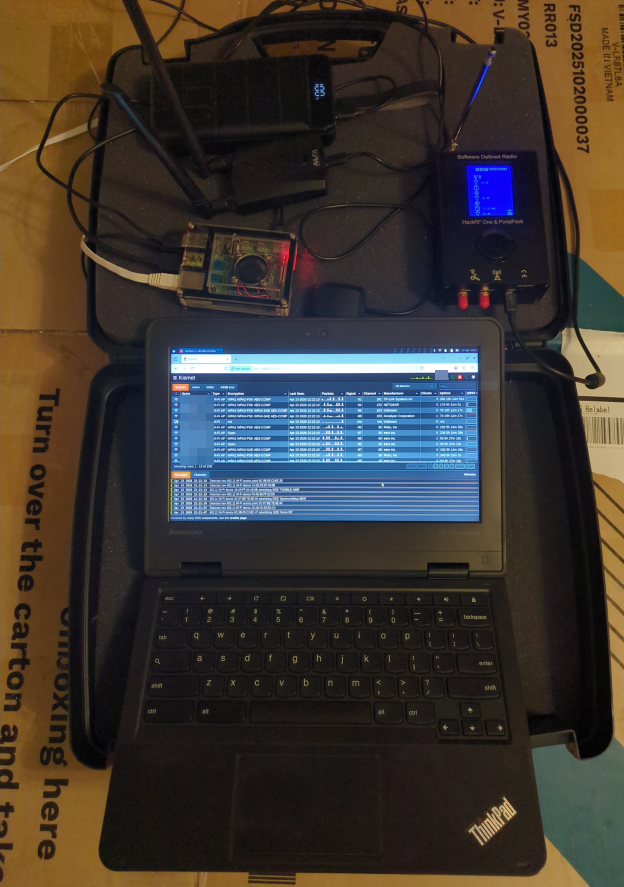
Kismet Wardriving
Kismet runs the Alfa adapter in monitor mode and passively captures every beacon frame in range - no active probing, no packets sent.
Per session Kismet logs:
.kismet- SQLite database with every device: MAC, SSID, encryption type, signal strength, GPS coordinate.wiglecsv- ready to upload to WiGLE.net.pcapng- raw packet capture, open in Wireshark.gpx- GPS track of the route
The web UI runs at port 2501 and shows a live map as you drive. Setup is in the wardriver repo:
git clone https://github.com/CyberDiary2/wardriver.git
cd wardriver && ./setup.sh
~/start-wardriver.sh wlan1
The Wardriver Dashboard
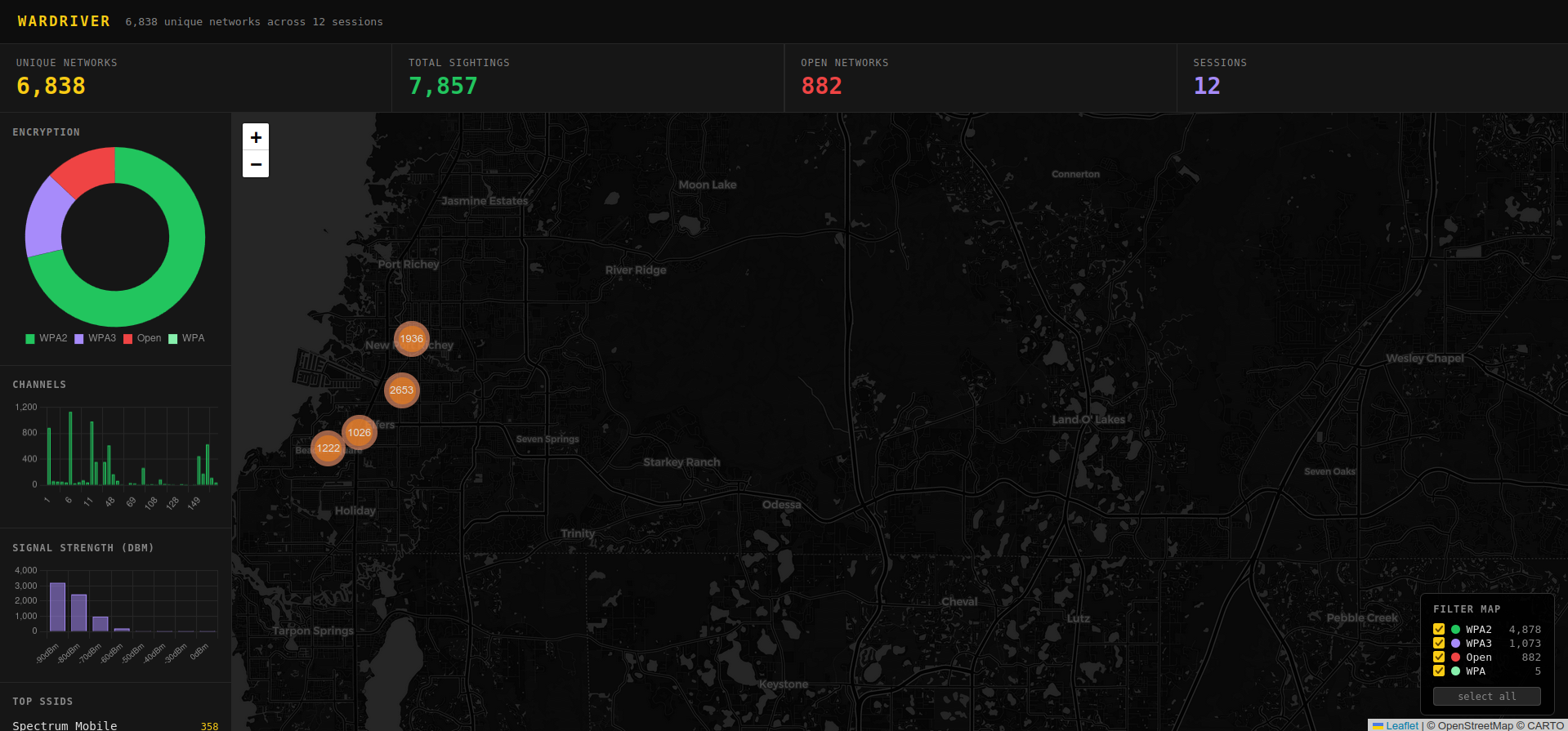
After several drives the raw data goes into a local SQLite database and a custom Flask dashboard for analysis.
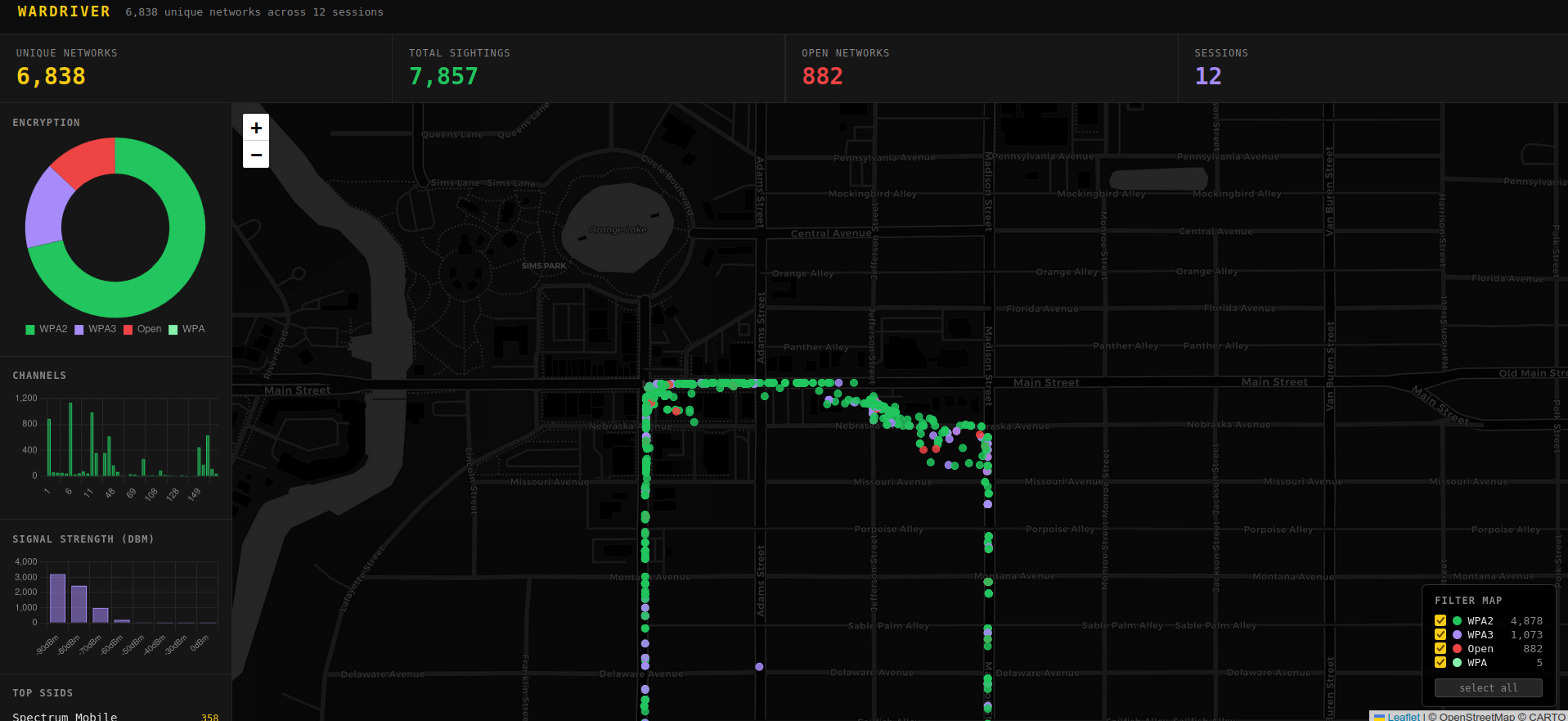
The data pipeline:
cd ~/wardriver-dashboard && ./run.sh
run.sh does everything automatically:
- SSHes to the Pi, extracts any new
.kismetsessions not already in the DB - Imports them incrementally (skips already-imported sessions)
- Starts the Flask dashboard at
http://localhost:5050and opens the browser
The dashboard includes:
- 6,838 unique networks across 12 sessions (454,043 total sightings)
- Encryption breakdown - WPA3: 1,073 / WPA2: 4,878 / Open: 882
- Channel usage chart
- Signal strength (RSSI) distribution
- Top SSIDs
- Interactive Leaflet map with per-encryption-type filtering
- Click any network on the map to see SSID, MAC, manufacturer, encryption, channel, signal strength
The database pulls real encryption data from Kismet’s .kismet SQLite files, not the wiglecsv format - so the encryption labels are accurate (WPA2/WPA3/WPA, not just WPS flags).
The Reverse SSH Tunnel
The Pi has no fixed IP - it could be on any network. A persistent reverse SSH tunnel via autossh solves this. On boot the Pi connects outbound to the VPS and holds the tunnel open:
# /etc/systemd/system/autossh-tunnel.service
ExecStart=/usr/bin/autossh -M 0 -N \
  -R 2222:localhost:22 \
  -o ServerAliveInterval=30 \
  root@<vps-ip>
From any machine with the right key:
ssh -p 2222 ops@<vps-ip>
The Pi is reachable no matter where it is. To view the Kismet map remotely:
ssh -L 2501:localhost:2501 -p 2222 ops@<vps-ip>
# open http://localhost:2501
Cell Tower Scanning
Wi-Fi wardriving is well-documented. LTE cell scanning from a moving car is less common.
Why not RTL-SDR?
Most tutorials target GSM (2G). That network is dead in the US - AT&T shut down in 2017, T-Mobile in 2022. Modern US infrastructure is LTE and 5G NR, which requires different tools.
lte_scan - power level sweep
Before trying to decode anything, the first step is confirming LTE carriers are actually present. lte_scan.py is a Python script using SoapySDR that sweeps all US LTE downlink bands and reports average and peak power per frequency:
python3 lte_scan.py
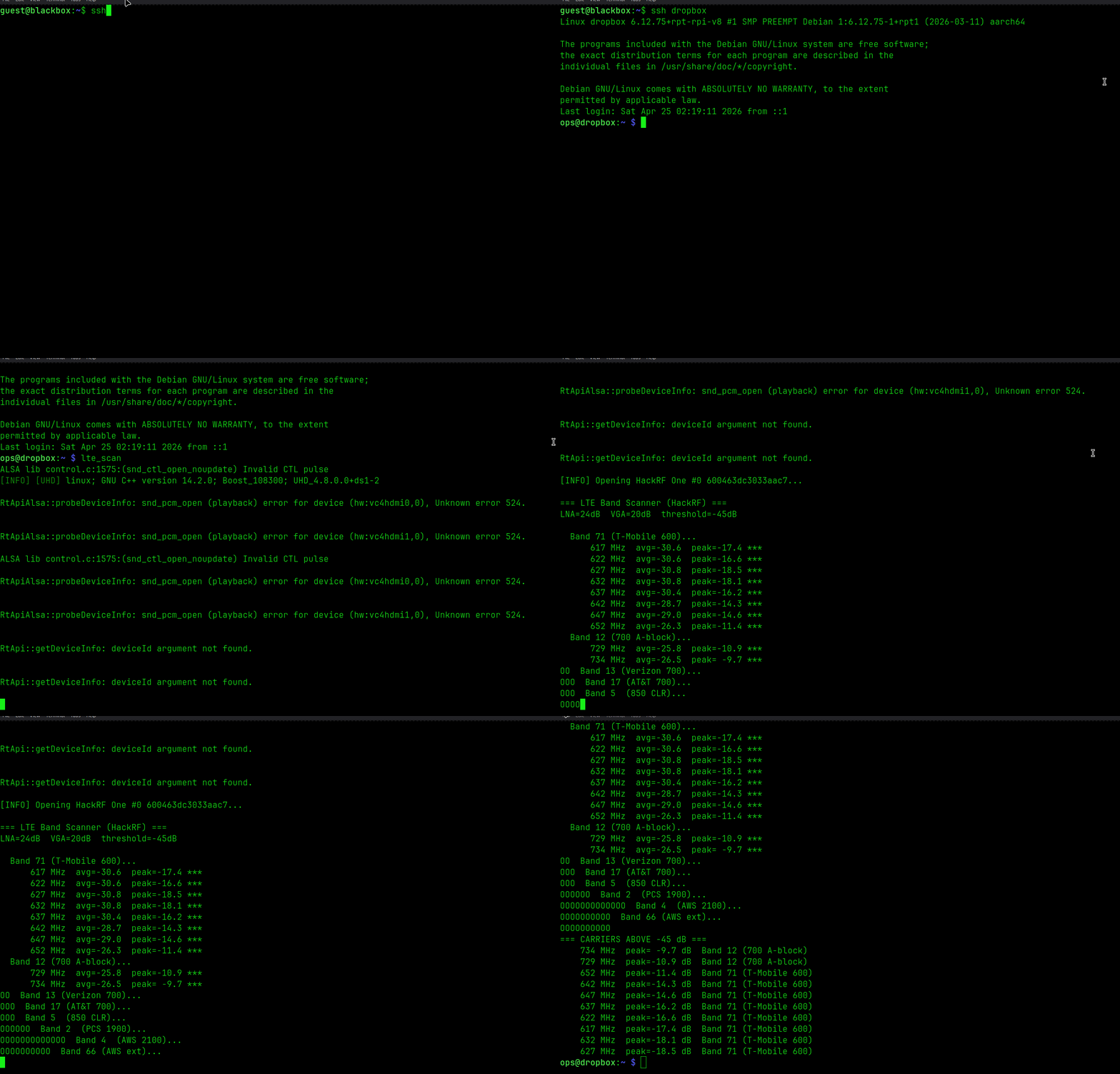
It sweeps:
- Band 71 (T-Mobile 600 MHz)
- Band 12/13/17 (700 MHz - T-Mobile, Verizon, AT&T)
- Band 5 (850 MHz CLR)
- Band 2 (PCS 1900 MHz)
- Band 4/66 (AWS 2100 MHz)
Any frequency where peak power exceeds the threshold (-45 dB) gets flagged. This tells you which carriers are in range before committing time to a full PSS decode. Run it outdoors - walls kill 700 MHz signals by 20+ dB.
HackRF + srsRAN
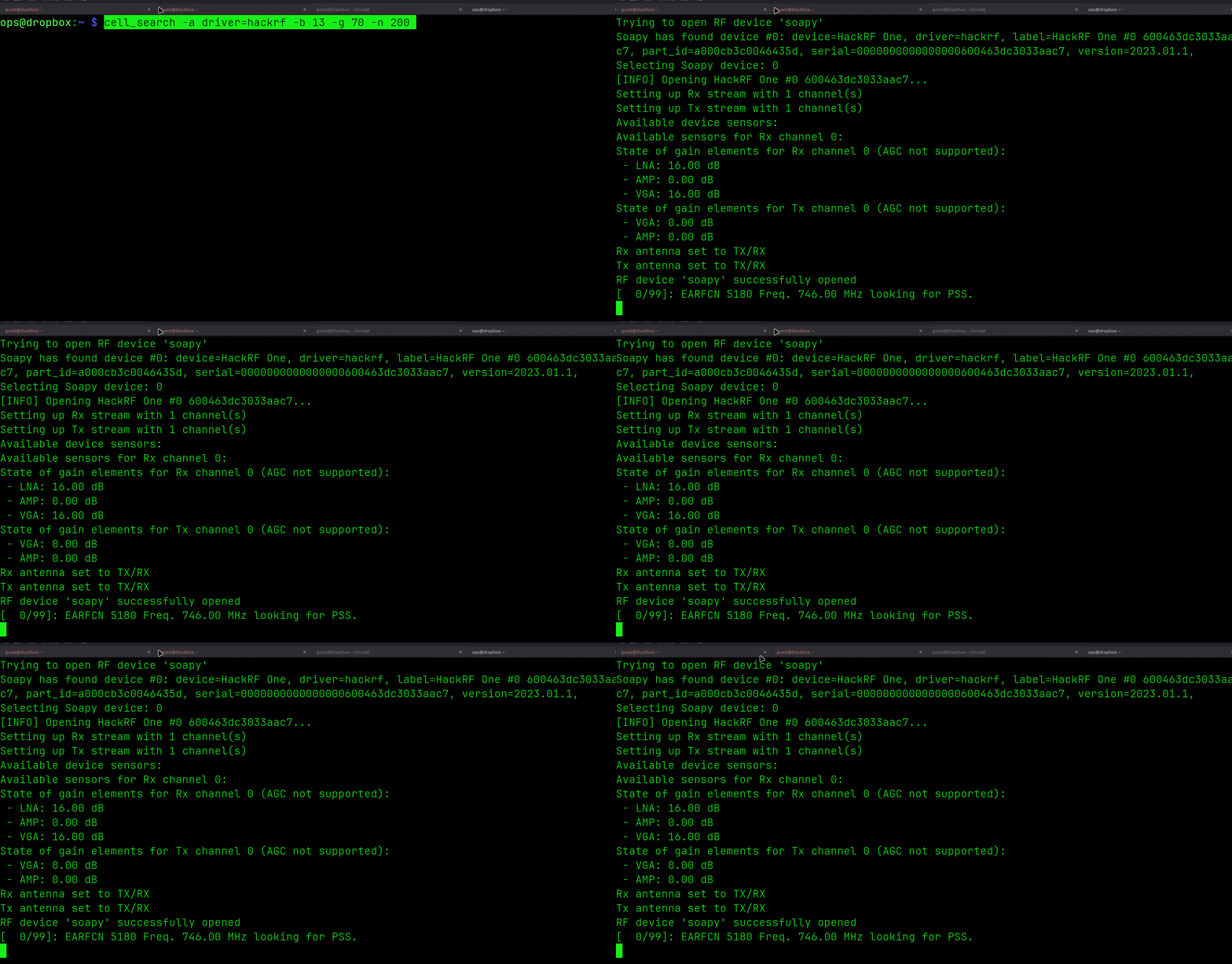
Once carriers are confirmed present, cell_search from srsRAN goes further and decodes the PSS (Primary Synchronization Signal) from LTE base stations - the first step toward extracting a cell’s physical cell ID.
srsRAN is built from source on the Pi with SoapySDR support:
git clone https://github.com/srsran/srsRAN_4G.git
cd srsRAN_4G && mkdir build && cd build
cmake .. -DENABLE_SOAPYSDR=ON
make cell_search -j4
Continuous Band Scanner
A loop script sweeps all US LTE downlink bands continuously while driving:
# /home/ops/cell-scan-loop.sh
BANDS="13 12 71 5 2 4"   # Verizon 700, T-Mobile 700/600, 850, PCS, AWS
cell_search -a driver=hackrf -b "$band" -g 70 -n 200
Key settings:
-n 200- 200ms per EARFCN (the original script used 20ms, too short to detect PSS)-g 70- full gain for weak signalstimeout 45per band - fast enough to sweep a full band while moving
When a cell is detected the result lands in cell-scan-logs/detections.log separately from the scan noise.
The scanner auto-starts on boot via systemd:
sudo systemctl enable cell-scan
sudo systemctl status cell-scan
No cells have been decoded yet - the indoor/window-mounted antenna kills 700 MHz by 20+ dB. An outdoor directional antenna or inline LNA is the next hardware step.
IMSI Catcher Detection
The end goal. IMSI catchers (Stingrays) impersonate legitimate LTE towers and force phones to connect. Detection means building a database of legitimate towers - frequency, physical cell ID, GPS location, signal characteristics - and flagging anything anomalous on each pass.
A real Stingray on LTE has signatures: wrong PLMN ID, frequency mismatch, unusual downlink power, temporary presence. The wardriving database is the baseline. This is the next phase.
Current State
| Component | Status |
|---|---|
| Kismet + Alfa wardriving | Working - 6,838 unique networks logged |
| u-blox GPS + gpsd | Working |
| Reverse SSH tunnel via VPS | Working |
| Wardriver dashboard | Working - Flask + SQLite + Leaflet map |
| HackRF via SoapySDR | Working |
| LTE band scanner (cell_search) | Running on boot, no decodes yet - needs outdoor antenna |
| IMSI catcher detection | Planned |
Code at github.com/CyberDiary2/wardriver